Free plug-ins

C++ (JUCE)

Windows 64-bit VST3, no account, no licence key, no expiry. They check for their own updates when they start, so you will know when a new version lands. Mac versions are planned.

v0.7.1

rvfModularHost

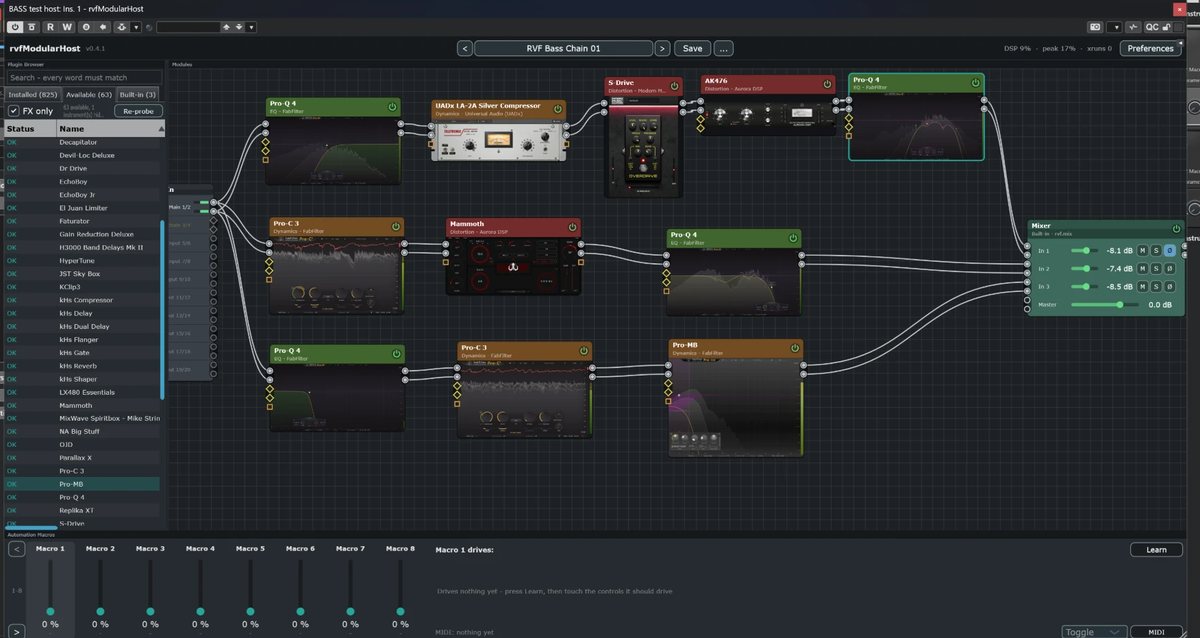
A host that lives inside your host. Drop your VST3 plug-ins onto a canvas, drag cables between them, and build the chain you actually want instead of the one the insert slots allow.

  • Free routing on a node canvas - series, parallel, any shape the chain needs
  • Presets that hold the whole graph: the nodes, the cables, and every hosted plug-in's own state
  • Undo and redo, thirty-two steps deep - a deleted plug-in comes back with its settings, not at its defaults
  • Eight macros the DAW automates, learned onto anything: a block's slider, a hosted plug-in's knob
  • Built-in blocks: a mixer with level, mute and solo on each input, a Blend fader between two chains, a Vector Blender pad between three or more, and audio and MIDI file players
  • The Vector Blender moves on its own, locked to the DAW's bar - corner tour, star, circle or drift, from eight bars to a sixteenth
  • Eight aux input and output pairs to reach the rest of your session
  • Pins that turn red the moment the signal passes 0 dBFS, and a toolbar that says what the graph delays the session by
  • Ctrl+L lays the selected nodes out along the path the signal takes - a crowded graph straightens itself
VST3 + standaloneWindows 64-bitFree

rvfModularHost open in a DAW: plug-ins on a canvas, cables running between them into a mixer.

Install

Close your DAW, then copy the whole
rvfModularHost.vst3 folder into
C:\Program Files\Common Files\VST3
over any older one. Rescan on the way back in.

The standalone app needs no installing:
Standalone\rvfModularHost.exe runs from anywhere.
v0.3.1

rvfWWiseConnector

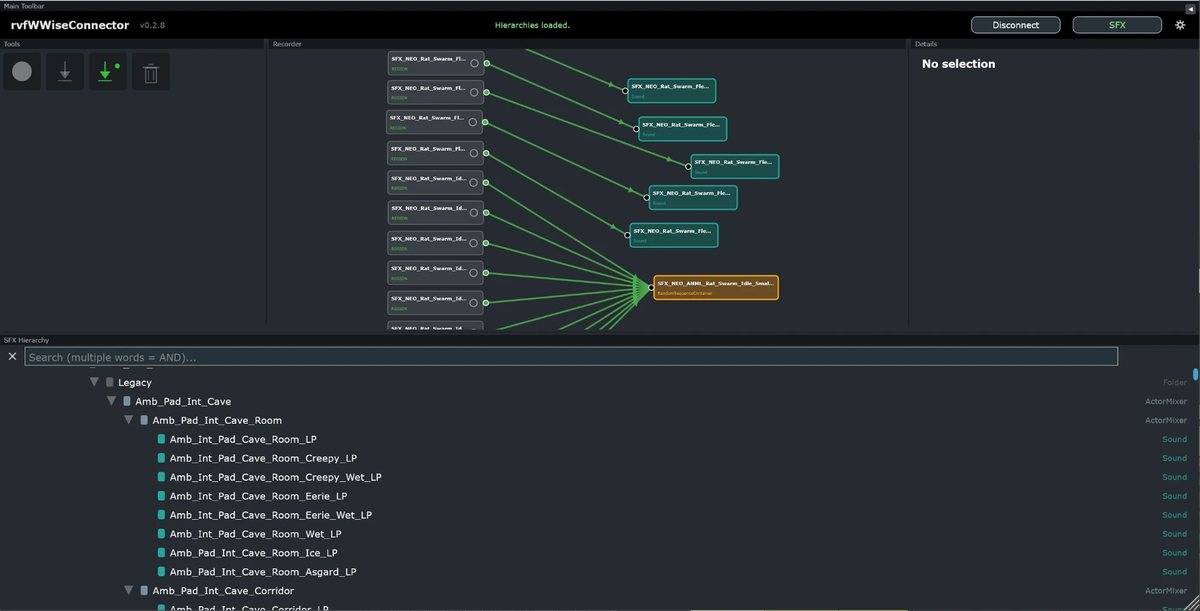
The bridge between your DAW and Wwise, and it runs both ways. Mark the zones you want on the timeline, let the transport roll, and the takes land in your Wwise project with their metadata already filled in - no exporting, no renaming. Coming back, a Sound from the Wwise tree drops onto a DAW track with its file.

  • Records what plays over the zones you drew, take after take
  • Imports into Wwise with BWF metadata written (project, originator)
  • Drag a Sound out of the Wwise tree onto a DAW track and its wav lands there - copied, never moved out of the Wwise project
  • A mono input fills both channels of a stereo take
  • A second pass over a zone is kept, not lost
  • The project's SFX hierarchy, with a search where every word typed has to match
  • A node view for what goes where, readable at any zoom

VST3 plug-inWindows 64-bitFree

rvfWWiseConnector: recorded regions on the left, the Wwise objects they feed on the right.

Install

Copy the whole rvfWWiseConnector.vst3 folder into
C:\Program Files\Common Files\VST3

Requires

Wwise installed, with a project open.
A VST3 host (Reaper, Cubase, Nuendo, Pro Tools
with a VST3 wrapper, ...).

Something broken? Something missing?

I listen to what you report, and it is what makes these tools better. If something breaks or crashes, do write to me and tell me what happened - the DAW, the version, what you were doing.

rvfaudio@gmail.com